How to Automatically Sync Facebook Lead Ads to WhatsApp in India (Step-by-Step 2026)
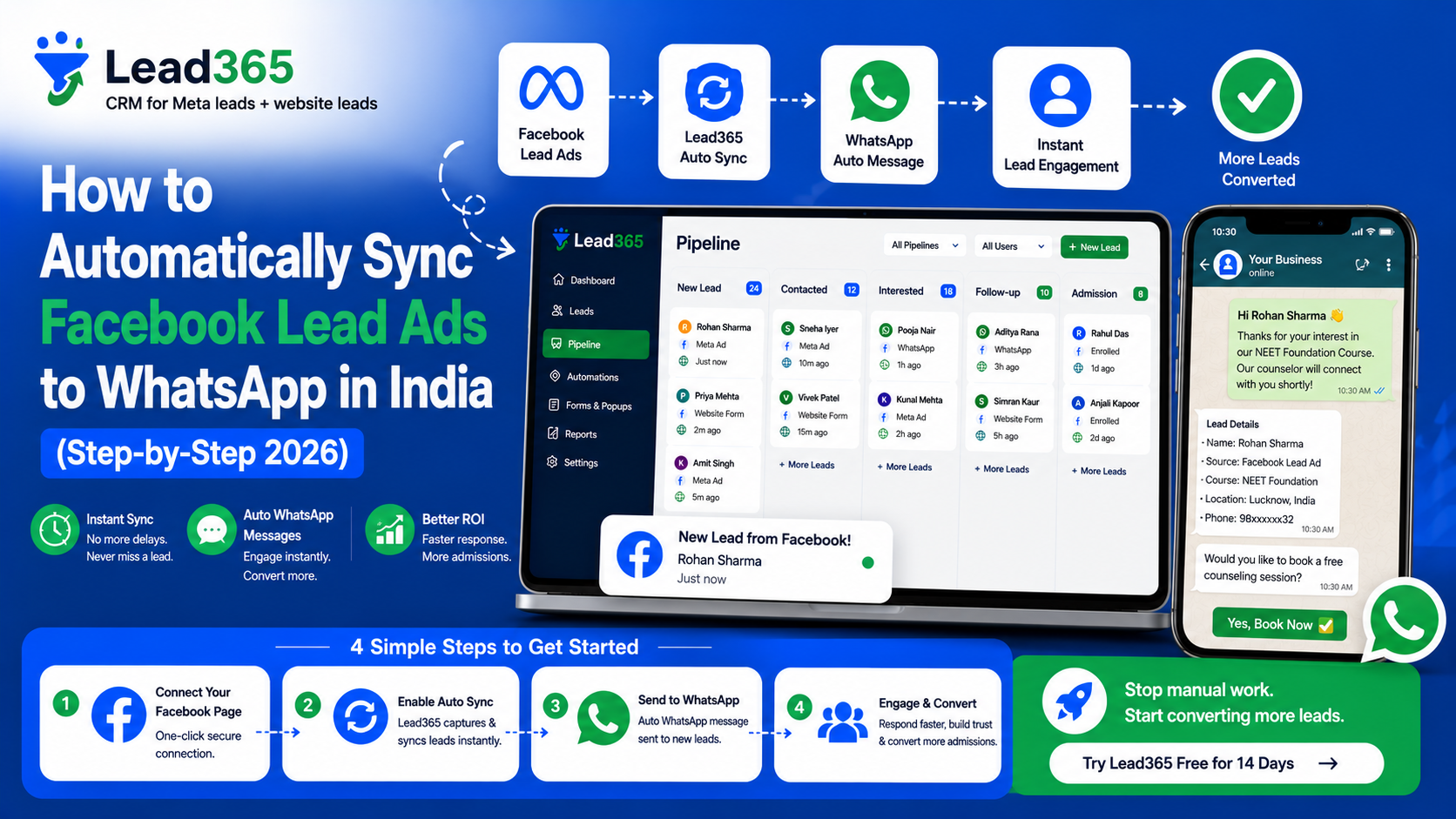
If you are running Meta Ads in India, you already know the struggle. You spend thousands on "Lead Generation" campaigns, but by the time your sales team downloads the CSV and calls the lead, the customer has either forgotten you or bought from a competitor who was faster.
In 2026, Email follow-up is dead in India. Indian customers live on WhatsApp. If you want to convert, you need to reach their WhatsApp inbox within 60 seconds of them clicking "Submit."
But how do you bridge the gap? Facebook doesn't natively send your leads to WhatsApp. You need a system to sync Facebook leads to WhatsApp India automatically. This guide will show you exactly how to build this "Instant Response" engine to 3X your ROI.
What is Facebook Lead to WhatsApp Automation?
Facebook Lead to WhatsApp automation is a technology workflow that instantly triggers a WhatsApp message to a prospect the moment they fill out a Meta Lead Ad form. Instead of manual data entry, a "bridge" software captures the lead via API and uses the WhatsApp Business API to send a pre-approved template message, ensuring a 98% open rate and instant engagement.
Why Should You Sync Facebook Leads to WhatsApp in India?
Before we get to the "How," let's look at the "Why." India is a mobile-first economy.
- Open Rates: Emails have a 10-15% open rate; WhatsApp has 98%.
- Speed to Lead: Responding within 5 minutes increases conversion by 400%.
- Customer Preference: 80% of Indian consumers prefer chatting with a business over a phone call from an unknown number.
- Trust: A professional WhatsApp message with your logo and a "Thank You" note builds immediate brand authority.
How to Sync Facebook Leads to WhatsApp India: The 6-Step Guide
To set this up, you don't need to be a coder. You just need the right Lead Management Software like Lead365 to act as the bridge.
Step 1: Set Up Your Meta Lead Ad Form
First, ensure your ad campaign is running using the "Instant Forms" objective.
- Pro-Tip: Keep your form short. Ask for Name, Phone Number, and maybe one qualifying question (e.g., "Budget" or "Location").
- Screenshot Placeholder: [Image: Meta Business Suite Lead Form Creation screen with 'Short Form' highlighted]
Step 2: Choose Your Bridge (Lead365)
Since Facebook doesn't send WhatsApps directly, you need Lead365. It connects your Meta Business Account to your WhatsApp Business API.
- Log in to Lead365.
- Go to 'Integrations' and select 'Meta Ads.'
- Screenshot Placeholder: [Image: Lead365 Dashboard showing the 'Connect Meta' button]
Step 3: Authorize Meta API Access
You will need to give Lead365 permission to "Read" your leads.
- Click 'Connect Account.'
- Select the specific Facebook Page and Instagram Account you are running ads for.
- Confirm permissions.
- Screenshot Placeholder: [Image: Facebook Permission pop-up window showing Lead365 authorization]
Step 4: Map Your Lead Fields
Now, tell the system which data goes where.
- Map "Full Name" from Meta to "Name" in your CRM.
- Map "Phone Number" to the "WhatsApp Number" field.
- Important: Ensure the phone number field in Meta includes the country code (+91) to avoid delivery errors.
- Screenshot Placeholder: [Image: Field mapping interface showing Facebook fields on left and CRM fields on right]
Step 5: Create and Approve Your WhatsApp Template
Because of Meta’s rules, you cannot send a "Random" message. It must be a pre-approved Template Message.
- Example: "Hi {{1}}! Thanks for inquiring about {{2}}. Our team will call you shortly. Meanwhile, check our brochure here: [Link]"
- Lead365 helps you get these approved by Meta in minutes.
- Screenshot Placeholder: [Image: WhatsApp Template editor with variables like {{1}} and {{2}} highlighted]
Step 6: Go Live and Test
Submit a "Test Lead" using the Meta Lead Ads Testing Tool.
- If your sync is correct, your phone should buzz with a WhatsApp message within 5-10 seconds.
- Screenshot Placeholder: [Image: A phone screen showing a real-time WhatsApp notification from a business]
Common Mistakes to Avoid When Syncing Leads
- Asking Too Many Questions: If your lead form has 10 fields, nobody will fill it. Keep it to 3-4 fields.
- Generic Messages: Don't just say "Thanks." Give value. Send a PDF brochure, a video link, or a discount code in that first WhatsApp.
- Ignoring the "Call" after WhatsApp: WhatsApp is for engagement, but in India, the call closes the deal. Use the WhatsApp message to tell them "I will call you in 2 minutes."
- Not Testing Daily: API connections can sometimes break due to password changes or Meta updates. Check your sync status every morning.
Industry Use Cases for WhatsApp Sync
Real Estate
- The Action: Lead enquires about a 3BHK.
- The WhatsApp: "Hi, here is the location map and floor plan for [Project Name]."
- The Result: Instant site visit booking.
Coaching & EdTech
- The Action: Student asks about "Digital Marketing Course."
- The WhatsApp: "Hi! Here is the syllabus and a link to watch a 5-minute demo class."
- The Result: Higher webinar attendance.
Healthcare & Clinics
- The Action: Patient fills a form for "Dental Checkup."
- The WhatsApp: "Hello, thank you for reaching out. Please click here to pick a time for your appointment."
- The Result: Reduced no-shows.
The Cost of Staying Manual vs. Automating
If you spend ₹1,00,000 on Meta Ads:
- Manual (Excel): You reach 40% of leads. Conversion 2%. Revenue: ₹2,00,000.
- Automated (Lead365): You reach 95% of leads. Conversion 6%. Revenue: ₹6,00,000.
The automation pays for itself in the first 48 hours.
Conclusion: Start Your Automation Journey Today
In 2026, speed is the only competitive advantage. When you sync Facebook leads to WhatsApp India, you aren't just "sending a message"—you are providing a superior customer experience that builds trust instantly.
Stop downloading CSVs. Stop losing leads to slow sales teams. Build your automation bridge and watch your conversions soar.
Ready to automate your Meta leads?
Try Lead365 Free and get your first WhatsApp automation running in under 10 minutes. Start your ₹99 Trial today!
Frequently Asked Questions.
To send an automated WhatsApp message to a Facebook lead, you must use a CRM or integration tool like Lead365. This tool connects to the Meta Ads API to pull lead data instantly and then triggers a message via the WhatsApp Business API. Manual automation is not possible through the standard WhatsApp app.
Lead365 is considered the best tool for Indian SMEs because it offers native Meta sync, built-in WhatsApp automation, and understands Indian business nuances like regional language support and high-volume lead management. Other options like Zapier or Interakt exist but often require multiple subscriptions.
There is no "completely free" way to do this because the WhatsApp Business API involves per-message costs from Meta. However, you can start with a low-cost trial like Lead365’s ₹99 plan to test the automation before committing to a full subscription.
Non-delivery usually happens due to: (1) Missing country code (+91) in the lead form, (2) Using a non-API WhatsApp number, (3) Your template not being approved by Meta, or (4) Your WhatsApp API account being blocked for spam. Always use a verified API provider to avoid these issues.
The "Golden Window" is under 1 minute. Automated systems like Lead365 usually deliver the message within 10-30 seconds. Delaying beyond 5 minutes significantly reduces the chance of the customer engaging with your message.
Ready to Stop Losing Leads?
Try Lead365 Pro for just ₹99. All features, 30 days, cancel anytime.
Start ₹99 Trial →