Website Popup Leads: Entry, Exit-Intent & Floating Buttons to Capture 20% More Leads in India (2026 Guide)
Introduction
You pay ₹12k for 2,000 website visitors via Google Ads. 1,980 leave without filling your contact form. Your popup could have saved 300 of them — but you have no popup, so they bounce to competitor.
Indian SMBs obsess over Meta ads but ignore website popup leads — the cheapest lead source at ₹0 ad spend. Entry popups, exit-intent popups and floating buttons capture the 95% who never click "Contact Us".
Best part? With Lead365 features, you paste 1 line of code and get all 3 popup types live in 3 minutes — no WordPress plugin bloat, no developer, auto-synced to same pipeline as Meta leads.
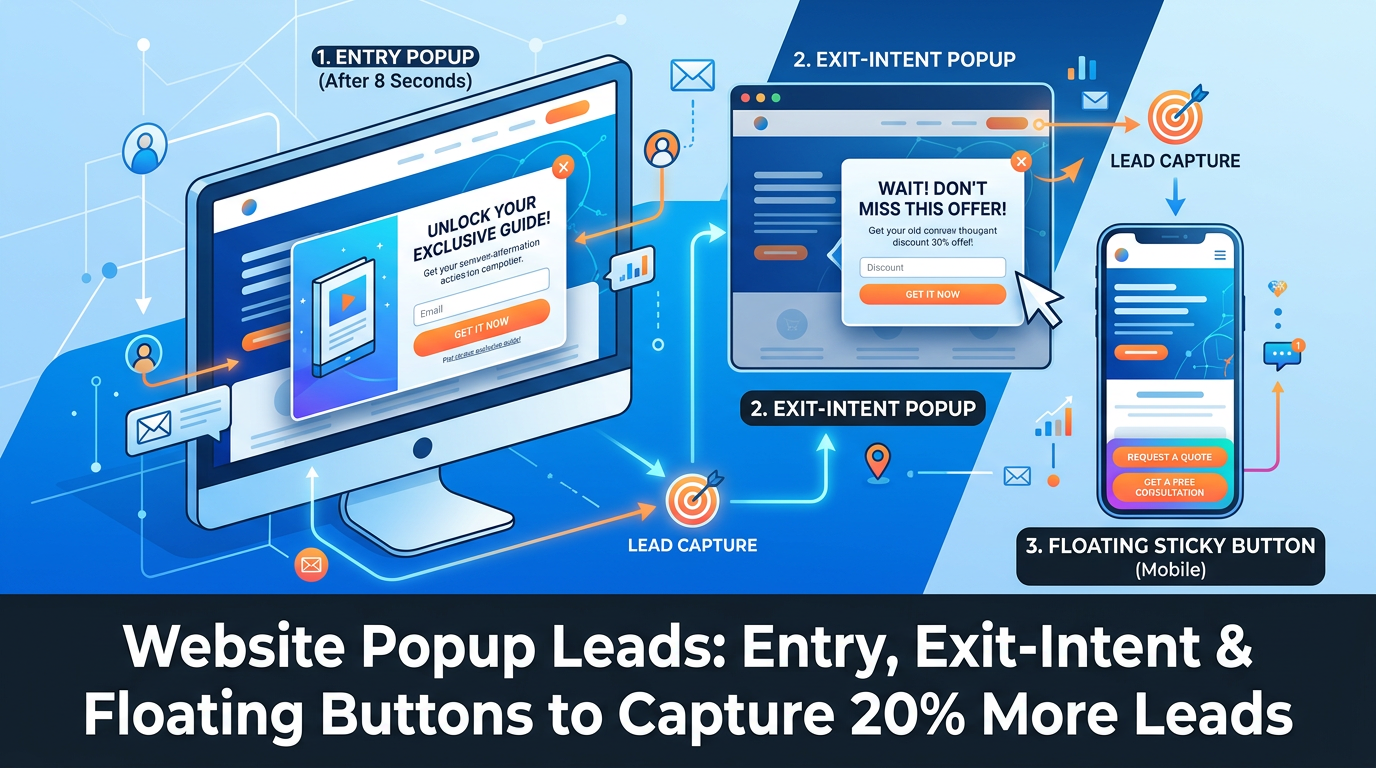
Direct Answer: To capture website popup leads in India, use: 1) Entry popup after 8 sec or 30% scroll, 2) Exit-intent popup when cursor leaves, 3) Floating button always visible. Setup in Lead365: Features → Popups → Create → Choose type → Design → Copy 1-line code → Paste in WordPress header → Leads flow to pipeline. Captures 15-20% more leads at 0 ad cost.
Key Takeaways
- Entry popup: Shows after 5-15 sec or scroll → best for first-time offers (10% off, free consultation).
- Exit-intent: Detects mouse leaving top → best for rescuing abandoners ("Wait! Get free site visit before leaving").
- Floating button/chat bar: Always visible corner button → best for mobile (62% traffic India) where exit-intent doesn't work.
- Lead365 1-line code replaces 3 WordPress plugins, syncs to same CRM pipeline, tagged "Popup" vs "Meta" for ROI.
- A/B Tip: Exit popup with FOMO ("15 people booked today") converts 3.1% vs generic 0.8%.
- Compliance: No spam, show once per 7 days, close X clear, DPDP consent checkbox.
Definition Box: 3 Popup Types India
| Type | Trigger India | Best Copy Example | Convert Rate India Avg |
|---|---|---|---|
| Entry Popup | Time 8 sec OR Scroll 30% OR New visitor | "Get Free Property Consultation Worth ₹2,000 — Enter Phone, Get Callback in 10 Min" | 2.8-4.5% |
| Exit-Intent Popup | Mouse moves to close/tab | "Hold On! Before You Go — Get Your Free Dental Checkup Slot Today (5 Left)" | 2.2-3.9% |
| Floating Button / Bar | Always visible bottom-right or slide-in | "Talk to Expert on WhatsApp" sticky button with pulse animation | 1.2-2.1% CTR |
| Hybrid: Popup + Form | Popup submits → Thank you with QR to WhatsApp | Seamless | +18% reply |
Benefits vs No Popup (Data India)
- +15-20 extra leads/week for 8k visitors/mo (FitZone Gym case — see Lead365 features testimonials: Dr. Amit got 15-20/week).
- Zero ad spend: Website traffic already paid via SEO/Google Ads — popup monetizes wasted 95%.
- Unified Pipeline: Popup leads tagged "Popup_Exit" vs "Meta_Noida" — see in Meta Ads lead management guide reports which source closes better.
- Mobile first: Floating button works on mobile where exit-intent doesn't (62% India traffic is mobile).
How Lead365 Popup Works (1-Line Code)
Lead365 → Popups → Design (drag logo, Hinglish text, phone field) → Publish → Copy <script src="https://app.lead365.in/popup.js?id=XYZ"></script>
   ↓
Paste in WordPress → Appearance → Theme File Editor → header.php before </head> OR Use Insert Headers plugin
   ↓
Visitor loads site → Script detects entry (8 sec) / exit-intent / floating → Shows branded popup
   ↓
User submits phone → Lead created in Lead365 pipeline Stage: New (Tag: Popup_Entry) → Auto WhatsApp + Assign (see [sync to WhatsApp guide](https://lead365.in/blog/sync-facebook-leads-to-whatsapp-india-guide))
   ↓
Reports → Source = Popup vs Meta
No WordPress plugin needed — one script handles all 3. Edit design in Lead365 anytime, no code re-paste.
Step-by-Step Setup (WordPress India, 3 Minutes)
Step 1: Create Popup in Lead365
Go to Lead365 features → Popups → New → Choose: Entry (8 sec) → Design: Headline Hinglish, 3 fields (Name, Phone +91, City), CTA "Get Callback", Trust "510+ businesses".
Step 2: Configure Triggers & Rules (India tuned)
Entry: Delay 8 sec, Scroll 30%, Show once per user 7 days, Hide on thank-you page, Mobile: show floating instead of exit. Exit-intent: Sensitivity medium, show if scrolled >20%, not on mobile.
Step 3: Copy 1-Line Code
Click Publish → Copy script line.
Step 4: Paste in WordPress
Method A (easy): WordPress → Plugins → Insert Headers and Footers → Header → Paste → Save.
Method B: Appearance → Theme File Editor → header.php → Paste before </head> → Update.
Divi/Elementor: Theme Settings → Integration → Header.
Step 5: Test + Sync Check
Visit site in Incognito → Wait 8 sec → Entry popup appears → Submit own +91 number → Check Lead365 pipeline in 2 sec → Should show tag Popup.
Step 6: Duplicate for Exit & Floating
Clone popup → Change type to Exit-Intent → Change headline "Wait! Don't Miss..." → Publish (same code auto-updates all 3, no repaste) → Check Reports after 3 days.
Use Cases India
Real Estate Delhi (Sharma Properties): Entry popup "Free Site Visit + Pickup" on MagicBricks traffic → 3.8% capture, 22 extra leads/week at ₹0 CPL. Tagged Popup_Delhi vs Meta.
Clinic Chennai: Exit-intent "5 Free Checkup Slots Left Today" → 3.1% rescue, show-up 38% vs 15% Meta cold.
Coaching Mumbai: Floating WhatsApp button pulse "Chat NEET Expert" → 2.3% CTR, 48 leads/mo mobile.
Gym Pune: Entry "Free Trial + Diet Plan" → Case of Gym Fitness CRM India shows trial show-up 3X.
Comparison Table: Entry vs Exit-Intent vs Floating
| Type | When Show | Mobile? | Best Offer | Lead Quality | Risk |
|---|---|---|---|---|---|
| Entry 8 sec | Early | Yes | Discount / Lead magnet | Medium (curious) | Can annoy if <5 sec |
| Exit-Intent | Leaving | No (desktop only) | Rescue + FOMO | High (already leaving) | Miss mobile |
| Floating Button | Always | Yes ★ | Chat/WhatsApp nudge | Highest intent (clicked) | Lower volume but intent |
| Combo (Lead365) | All 3 with same code | Yes | — | Best | 0 extra cost |
India Tip: Always enable Floating on mobile + Entry on desktop — covers 100%.
Pros & Cons
Pros: +20% leads free, 1 code, A/B ready, mobile floating, DPDP checkbox.
Cons: Over-trigger = annoyance → Set 7-day frequency cap; Ad blocker can hide but <8% in India.
Best Practices
- Delay entry 8-12 sec, not 0 — let visitor read.
- Exit copy use FOMO number: "12 booked today" real from CRM.
- Always phone +91 required, email optional — Indian leads hate email.
- Show once per 7 days, cookie-based.
- Add trust: "Trusted by 510+ Indian businesses" from About.
- A/B test weekly: Headline A Hinglish vs English — Lead365 Reports shows winner.
Common Mistakes
- Popup 0 sec → 40% bounce.
- No mobile floating → lose 62% traffic.
- 3 WordPress plugins → site speed -22 points.
- No tagging → can't know popup vs Meta ROI.
- No close X → Google penalizes interstitial.
Expert Tip
Use Lead365 Reports → Source = Popup to calculate popup CPL = ₹0 vs Meta ₹250 — pitch to owner: "Popup gave 18 leads free = ₹4,500 saved".
Trends 2026
- Google "Intrusive interstitial penalty" targets full-screen on mobile — Lead365 floating bar is compliant (bottom 20%).
- AI personalization: Show Tamil popup if browser language ta-IN.
Conclusion
Popup leads are your cheapest leads — visitors you already paid for. One line of Lead365 features code gives you entry + exit + floating, synced to same pipeline as Meta, with fair round-robin. Start with Entry 8 sec + Floating mobile, test exit, check Pricing — Starter ₹799 includes unlimited popups.
Create Your First Popup → Free 30 days.
Frequently Asked Questions.
Copy Lead365 1-line script and paste in Insert Headers plugin — 30 sec, no plugin bloat.
Exit-intent 3.1% slightly beats entry 2.8% on desktop, but floating wins mobile. Use all 3.
Single Lead365 script ~18KB async — no slowdown vs plugins 200KB.
Yes, same automation as Meta → instant WhatsApp sync guide.
Yes if not full-screen on first load mobile and closeable — Lead365 default compliant.
8k visitors → 15-20 extra/week at 2-4% rate (Lead365 avg).
Ready to Stop Losing Leads?
Try Lead365 Pro for just ₹99. All features, 30 days, cancel anytime.
Start ₹99 Trial →